




Finding the best TTS API for your project can feel overwhelming. With dozens of providers promising natural-sounding voices, flexible pricing, and enterprise-grade reliability, how do you separate genuine value from marketing noise?
This guide gives you a clear, high-level overview of every factor that matters when choosing an API — from voice quality and customization to pricing and commercial licensing.
Each section below links to a deeper dive on that specific topic, so consider this your starting point before drilling into the details.
Why a TTS API matters more than ever

Text-to-speech technology has evolved dramatically over the past few years. What once sounded robotic and flat now rivals human narration in many contexts.
That shift has made TTS APIs critical infrastructure for:
- App developers building accessibility features or voice-enabled interfaces
- Content creators producing podcasts, YouTube videos, or e-learning courses at scale
- Enterprise teams powering IVR systems, internal training modules, and customer-facing chatbots
- Game studios generating dynamic dialogue without booking voice actors for every line
“The global text-to-speech market size was valued at USD 3.45 billion in 2024 and is projected to grow at a CAGR of 14.6% from 2025 to 2030.”
— Grand View Research, 2025
That growth is being driven largely by API adoption. Businesses no longer want to install desktop software or manage on-premise speech engines.
They want to send text to an endpoint and get audio back — fast, reliably, and affordably.
A well-chosen text-to-speech API becomes the backbone of that workflow, handling everything from single-sentence UI prompts to hour-long audiobook chapters.
How to choose the best text-to-speech API with natural voices

Not all TTS APIs are created equal when it comes to voice quality.
The difference between a mediocre provider and a good API often comes down to the underlying model architecture — whether the provider uses concatenative synthesis, parametric models, or the latest neural network approaches.
What to listen for
When evaluating voice naturalness, pay attention to:
- Prosody — Does the voice rise and fall in pitch the way a human speaker would?
- Pacing — Are pauses placed naturally, especially around commas, periods, and paragraph breaks?
- Emotion — Can the voice convey warmth, urgency, or calm depending on context?
- Artifact-free output — Listen for clicks, buzzing, or unnatural stretching of vowels.
Key questions to ask any provider
- How many voices are available, and in how many languages?
- Are the voices generated by neural models or older concatenative methods?
- Can you preview voices before committing to a paid plan?
- How often does the provider add or update its voice library?
The providers that consistently rank among the best TTS API options tend to offer large voice libraries with multilingual support and regular model updates.
For a detailed comparison of providers ranked specifically by natural voice quality, read our full guide on the best text-to-speech API with natural voices.
Voice customization: making a TTS API truly yours

Having a great-sounding default voice is one thing.
Being able to tailor that voice to your brand, product, or audience is another — and it’s often the feature that separates a good API from the best TTS API for professional use.
Common customization options
- Pitch and speed controls — Adjust how high or low the voice sounds and how quickly it speaks.
- Voice cloning — Upload audio samples to create a synthetic version of a specific speaker.
- Style and emotion tags — Switch between cheerful, serious, whispering, or conversational delivery.
- Pronunciation dictionaries — Override default pronunciations for brand names, acronyms, or technical terms.
Why customization matters for brand identity
Think about how recognizable certain brand voices are — from GPS navigation apps to smart assistants.
If your product relies on voice output, a generic off-the-shelf voice can feel disconnected from your brand. The best TTS API lets you close that gap without hiring voice actors or building a model from scratch.
Some APIs offer customization through simple parameter adjustments in the request body.
Others provide full voice-cloning pipelines where you upload training data and receive a bespoke voice model.
The right approach depends on your budget, timeline, and how distinctive you need the output to sound.
For a deeper look at which providers offer the most flexible customization tools, check out our article on text-to-speech API voice customization.
The role of SSML support in fine-tuning speech output
Even with excellent default voices and broad customization options, there are moments when you need granular, line-by-line control over how text is spoken.
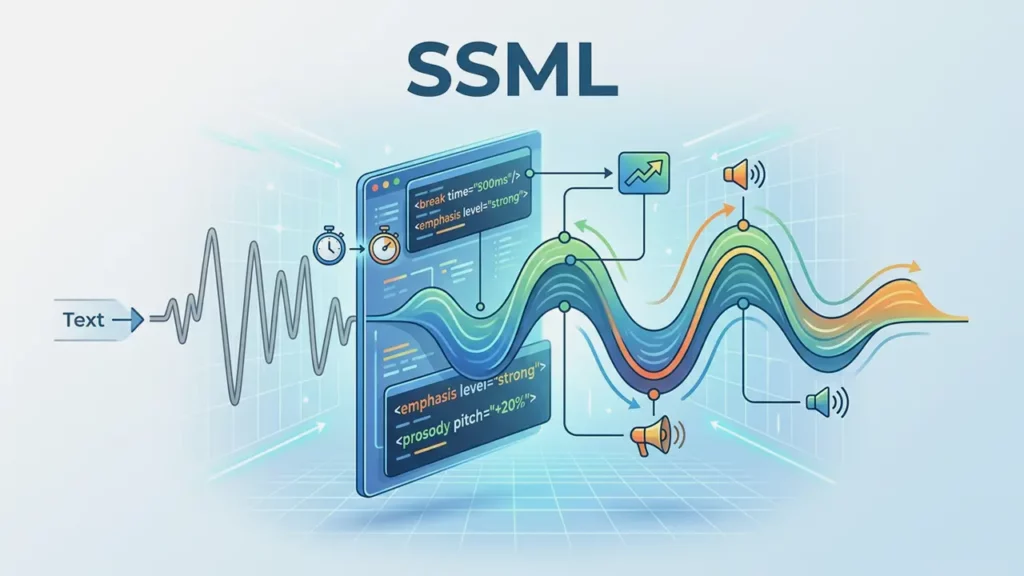
That’s where SSML — Speech Synthesis Markup Language — comes in.
What SSML lets you do
SSML is an XML-based markup language that gives developers precise control over speech output. With it, you can:
- Insert specific pauses of defined duration using <break> tags
- Spell out abbreviations or read strings as individual characters
- Emphasize particular words or phrases
- Switch between languages mid-sentence for multilingual content
- Control volume, rate, and pitch at the sentence or word level
Why it matters for production-quality audio
Consider a medication name that the TTS engine mispronounces, or a dramatic pause you need before a key line in an e-learning module.
Without SSML, you’re stuck with whatever the engine gives you. With SSML support, you can fine-tune those moments without re-recording or rewriting your content.
Not every API implements the same SSML tags, though. Some support the full W3C specification; others support only a subset or use proprietary alternatives.
Before committing to a provider, it’s worth testing whether the specific tags you need actually work as expected.
“SSML is to TTS what CSS is to HTML — it separates content from presentation and gives you control over the final output.”
— W3C Speech Synthesis Markup Language Specification
For a breakdown of which APIs offer the most comprehensive SSML implementation, read our guide on the best API SSML support.
Using a TTS API for commercial projects
If you’re building a product, service, or piece of content that generates revenue, licensing becomes a critical consideration.
Not every TTS API grants you the right to use its output commercially — and the ones that do often have varying restrictions.
What to watch out for
- License scope — Does the license cover SaaS products, broadcast media, physical products with embedded audio, or all of the above?
- Attribution requirements — Some free tiers require you to credit the provider. That may be fine for a blog post but awkward for a polished commercial.
- Revenue thresholds — Certain providers restrict commercial use to businesses under a specific annual revenue.
- Redistribution rights — Can you distribute the generated audio files to end users, or only stream them?
Industries with specific commercial needs
The licensing question isn’t hypothetical. It affects real decisions in industries like:
- Advertising and marketing — Voiceovers for radio spots, social media ads, and explainer videos
- Publishing — Audiobook production where distribution rights are contractually complex
- Telecommunications — IVR and on-hold messages for businesses of all sizes
- Gaming — Character dialogue shipped inside a downloadable product
A best TTS API for commercial work is one that offers clear, unambiguous licensing terms so you don’t discover a restriction after you’ve already shipped your product.
Our detailed guide on using an API for commercial projects walks through the licensing models of leading providers and highlights which ones are safest for revenue-generating use cases.
Finding the cheapest text-to-speech API without sacrificing quality

Budget matters — especially for startups, indie developers, and creators working without enterprise backing.
The good news is that competition in the TTS space has pushed prices down significantly.
The bad news is that pricing structures vary so wildly across providers that direct comparison can be confusing.
Common pricing models
| Model | How it works | Best for |
|---|---|---|
| Pay-per-character | You’re billed based on the number of characters processed | Variable, unpredictable workloads |
| Pay-per-request | Flat fee per API call regardless of text length | Short, consistent prompts |
| Monthly subscription | Fixed fee for a set character or minute quota | Predictable, high-volume usage |
| Freemium | Free tier with limited characters; paid tiers unlock more | Testing and prototyping |
Hidden costs to watch for
The sticker price isn’t always the real price. Keep an eye on:
- Overage fees — What happens when you exceed your quota mid-month?
- Premium voice surcharges — Some providers charge extra for their best neural voices.
- Storage and hosting — A few APIs charge for storing generated audio files on their servers.
- Support tiers — Enterprise SLAs with guaranteed uptime and priority support often come at a premium.
Finding a cheap API isn’t just about the lowest per-character rate.
It’s about matching the pricing model to your actual usage pattern so you don’t overpay for capacity you don’t need or get hit with surprise charges.
For a full cost comparison across leading providers, see our article on the cheapest text-to-speech API.
Common mistakes to avoid when picking a TTS API

Even experienced developers can fall into traps during evaluation. Here are the pitfalls we see most often — and how to sidestep them.
1. Choosing based on demos alone
Provider demo pages are curated. They showcase the best voices reading ideal sentences. The real test is feeding the API your actual content — technical jargon, long-form paragraphs, edge cases with numbers, dates, and abbreviations. A best TTS API should handle your content gracefully, not just a cherry-picked script.
2. Ignoring latency requirements
If your application needs real-time or near-real-time audio (think voice assistants, live accessibility tools, or in-game dialogue), average response time matters as much as voice quality. Some providers optimise for batch processing and return beautiful audio — in three seconds. Others prioritise streaming and deliver the first audio chunk in under 200 milliseconds. Know which category your project falls into before you commit.
3. Overlooking long-term lock-in
Switching TTS providers mid-project is painful. Audio output changes, pronunciation dictionaries need rebuilding, and SSML tags may not transfer cleanly. Before you integrate, consider whether the provider offers standard formats and interfaces that would make a future migration manageable — or whether you’d be locked into proprietary tooling.
4. Skipping the license fine print
We covered this in the commercial section above, but it bears repeating: assuming that “paid plan” equals “commercial rights” is a mistake. Always read the terms of service, and if anything is ambiguous, ask the provider directly before you build on top of their output.
Final thoughts
Choosing the best TTS API is ultimately about alignment — matching a provider’s strengths to your project’s specific needs.
A solo podcaster optimizing for cost will prioritize differently than an enterprise team building a multilingual customer service platform.
The landscape is moving fast. Models are getting more expressive, pricing is getting more competitive, and the gap between synthetic and human speech continues to narrow.
Whatever your use case, taking the time to evaluate voice quality, customization options, SSML capabilities, commercial licensing, and pricing structure will save you from costly migrations later.
Start with the overviews linked throughout this guide, test two or three providers side by side, and let the audio speak for itself.