




Hey Creators!
You asked, and we delivered!
After much anticipation, we are thrilled to announce that the Typecast mobile app is officially available!
All the power, quality, and creative depth you rely on from Typecast’s desktop platform is now right where you need it—on your phone. Get ready to kiss desktop dependence goodbye and create wherever inspiration strikes.
Feature 1: The Same Studio-Quality TTS—Fully Mobile
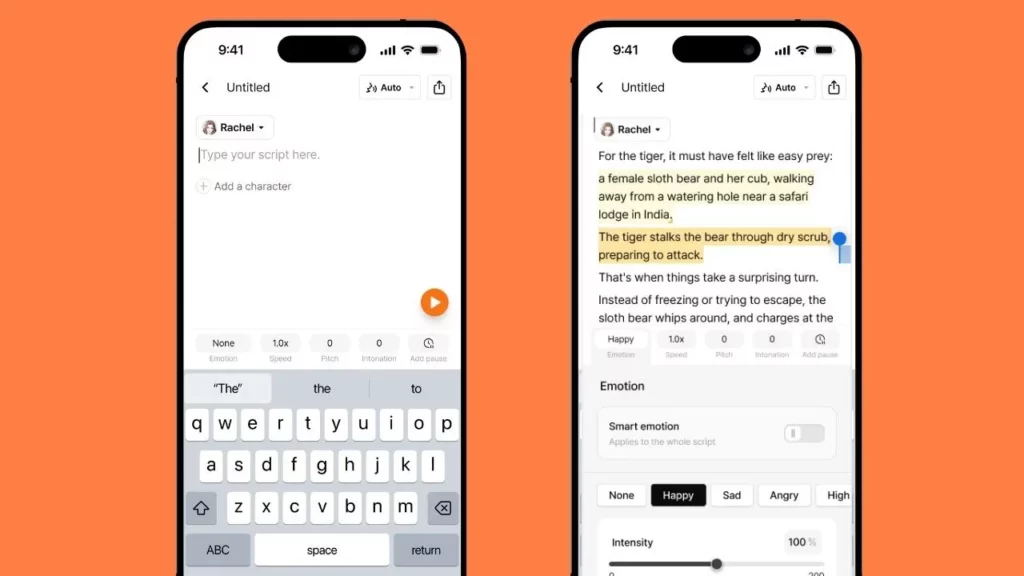
Forget stripped-down mobile versions. We’ve brought the entire Typecast experience to your pocket.
- All 600+ Voices: Access our complete library of over 600 professional AI characters.
- Every Emotion, Every Nuance: Need a joyful laugh, an angry rant, a soft whisper, or excited cheers? All expressions are fully supported, allowing you to fine-tune emotion, pitch, speed, and more simply by typing your script.
- Create Anywhere and Everywhere: Whether you’re on your commute, grabbing a coffee, or lounging on the couch, your full creative workflow travels with you.
Feature 2: Create Smarter, Not Harder
Speed is everything in mobile content creation. The Typecast app eliminates friction so you can focus on making magic.
- Instant Direct-to-Phone Saving: Your voice is ready the moment it’s generated. One tap saves the final voice file directly to your device—zero extra steps!
- Seamless Integration: No more transfers. No more conversions. Open your final audio file and use it instantly in any app or editing tool you love.
- Drop Studio-Quality AI Voices into Your Content: Quickly elevate your mobile videos—Reels, Shorts, TikToks, videos, and more—with professional voiceovers.
Your next hit is ready. Grab it and go!
Feature 3: Work Smarter with PC-Mobile Integration
Your workflow should be flexible, not frustrating. We’ve introduced seamless synchronization to bridge the gap between devices:
- Synchronized Projects: All your projects are synchronized across both your PC and mobile devices. Start on your phone and finish on your desktop, or vice versa, comfortably.
- Simplified Workflow: See all your projects at a glance on the home screen, meaning no file movement is needed to jump between devices.
Getting Started in 3 Simple Steps
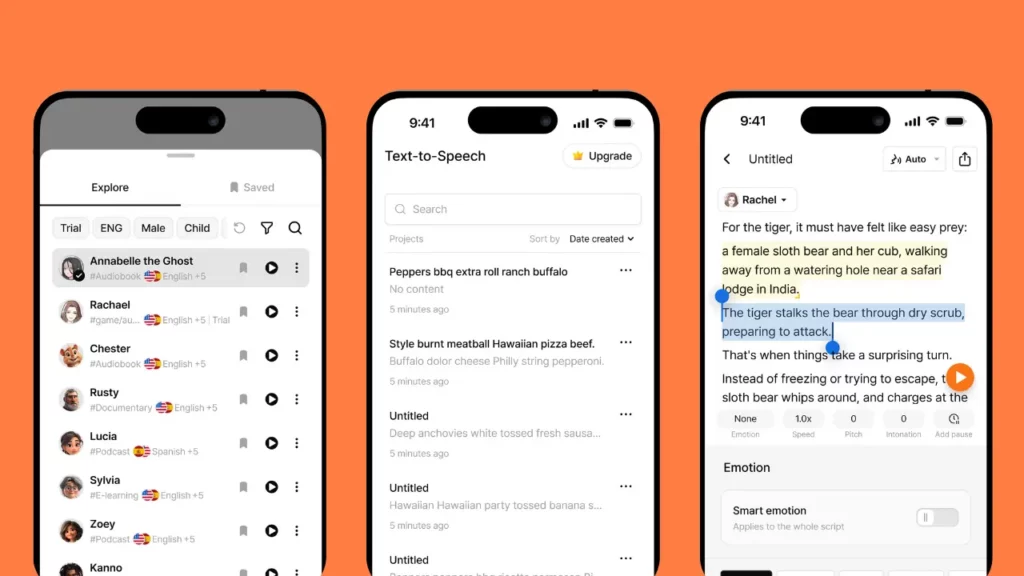
The app is intuitive and designed for instant creativity:
- Create a New Project: Tap ‘New Project’ on the home screen to get started instantly.
- Choose Your AI Voice: Browse the vast library of over 600 characters and select the perfect voice for your script.
- Enter Text and Generate: Type in your text, fine-tune the emotion and audio settings, and hit ‘Generate’ for a perfect voiceover.
✨ Creative Freedom, Unlocked
This isn’t just a feature update—it’s creative freedom unlocked. We’re giving every creator the power to use the full Typecast experience from anywhere.
From text-to-speech to full video editing, you can now create anytime, anywhere—all from the comfort of your phone.
Ready to fall in love with the new app? Let’s go!