





Batch text-to-speech turns a set of approved scripts into separate, traceable audio files. A useful batch workflow records which input produced each file, preserves completed work, and gives a failed item a clear recovery path. You can begin with three short lines before attempting a larger production job.
We put that approach into practice with Typecast API and its official Cast CLI, generating three original WAV files from fictional workshop messages. We also tested a recovery step and confirmed that rerunning the job skips completed files. Follow the example to build a small, traceable workflow you can adapt to your own projects.
For the wider questions to resolve before choosing an integration, read our TTS API guide.
What this batch actually does
The runner reads a CSV, sends each row as a speech-generation request through Cast, and records the results in a manifest. This straightforward sequential example makes it easy to follow each input and output as you build a workflow around Typecast API.
Typecast’s official CLI overview documents saving generated speech to a file. We used that authenticated client to keep API credentials out of our Python script. Readers need an installed, authenticated Cast CLI and Python 3 to run this example. No installation was needed in our test environment.
The settings are explicit. All three messages use Cyrus, voice ID tc_62b1a67457cd7072bed6bf33, model ssfm-v30, English, the normal emotion preset, tempo 1.0, and seed 42. These are the settings tested here, not a recommendation that every project should use the same model or voice. Check the current speech API reference when adapting the workflow.
Prepare stable inputs for batch text-to-speech
Each input row has a job_id, script, and voice_id. The job ID identifies the editorial item, such as welcome or update. It remains stable when the script changes. The output filename includes a short hash of the script and generation settings, so a new input version receives a different filename.
Use a CSV parser rather than splitting each line at every comma. The Python CSV documentation explains dictionary-based readers and quoted fields. Our runner uses DictReader so a comma inside a quoted script stays part of that script.
Before submitting any requests, it rejects duplicate job IDs, IDs containing unexpected characters, and empty scripts. The allowed ID characters are letters, digits, underscores, and hyphens. That narrow rule keeps row identifiers suitable for filenames. The example has no personal information, licensed quotations, or confidential customer copy.
The application validates each input before sending it. If a voice ID or model needs correcting, the manifest gives the operator a clear record of the affected row.
Run the original three-row job
The downloadable test kit contains the input CSV, Python runner, final manifest, and exact WAV outputs. It includes no credentials. Read the script and use a separate output folder before adapting it to your own approved copy. Generating new speech uses your API account and credits.
From the extracted folder, run this command after authenticating the official CLI.
python3 batch_runner.py inputs.csv batch-output
The runner asks Cast to save a temporary WAV, opens it to check its format and duration, and creates the final output without overwriting an existing file. A completed row records the full input hash, output filename, SHA-256 file hash, attempt count, settings, timestamp, and measured duration. An unrecognized existing output is a reconciliation error, not permission to replace it.
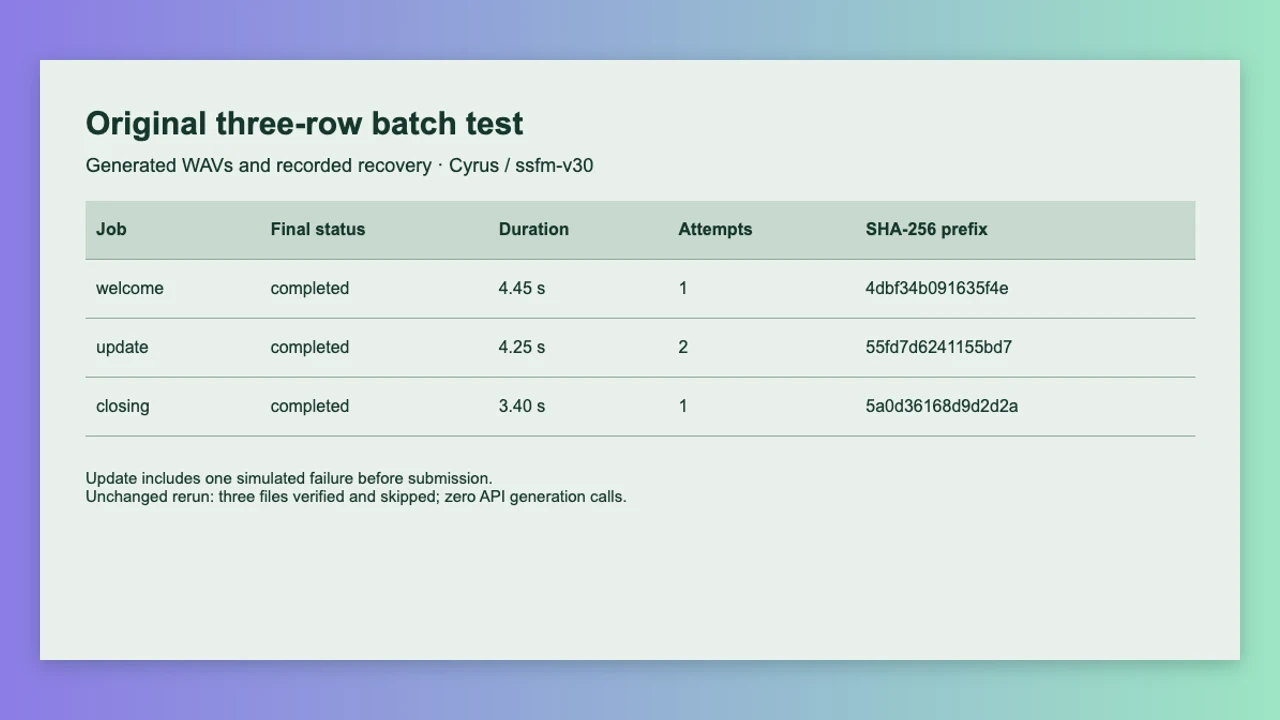
Here are the measured final results. The update’s two attempts include one deliberate failure before any API call. The other rows each needed one generation attempt.
| Job | Final WAV duration | Recorded attempts |
|---|---|---|
| welcome | 4.45 seconds | 1 |
| update | 4.25 seconds | 2, including the injected failure |
| closing | 3.40 seconds | 1 |
We made these original samples with Typecast text-to-speech through its API. They use the Cyrus stock voice and contain fictional workshop instructions.
Welcome · 4.45 seconds
Welcome to the fictional Field Notes workshop. Your first activity is ready.
Room update · 4.25 seconds
The next activity begins in Room Two. Please follow the signs from the foyer.
Closing · 3.40 seconds
That completes this fictional workshop. Thank you for taking part.
Make recovery selective

To demonstrate recovery, we ran the test with the command’s –simulate-failure update option. This intentionally raises a local error before the update request is sent. Welcome and closing generated successfully, while the manifest marked the update as simulated_failed so it could be handled separately.
Running the normal command next checked the completed welcome and closing files against their stored hashes and skipped them. It generated only the update file, recorded the second attempt, and left the other two output hashes unchanged. A third run skipped all three verified completed rows and made zero API generation calls.
For an uncertain request, the example leaves the retry decision to the operator. Check the local result, account activity, and error context before resubmitting, so you can avoid duplicate work or additional credit use. This example does not test provider-side idempotency.
The runner stores bounded failure categories rather than printing raw command output that might contain private details. A failed row stays visible in the manifest, while later rows can continue. Use a fresh directory for failure-injection exercises so the test cannot affect an approved production package.
Preserve provenance when copy changes
A successful file is reusable only when its input and settings still match. Before skipping a row, the runner checks its completed status, input hash, file existence, and byte hash. A matching filename by itself is insufficient. If the bytes are missing or changed, stop and reconcile the artifact rather than silently trusting it.
A revised script creates a new input hash and a new output filename. Keep the earlier manifest and approved version together before making the revision. The example’s manifest describes the current job state; it is not a complete historical database. For a longer-running system, retain versioned manifests or append an event log so previous approval decisions remain recoverable.
Run only one instance against an output directory at a time. The manifest uses a temporary file and replacement for each checkpoint, but the small demonstration does not implement a queue lock, distributed workers, resumable cloud storage, or crash recovery after every possible filesystem failure. Those are engineering tasks to complete before scaling the pattern.
Review files before expanding the queue

All three final files are mono, 16-bit PCM WAV at 44.1 kHz. We checked decoded duration, non-silent samples, and clipping, then tested normal-speed browser playback. These checks establish that the delivered files can be decoded and played. They do not judge pronunciation, emphasis, or whether a venue audience will understand the message.
Listen to each line with its transcript, check the intended delivery context, and record approval against the exact filename and hash. Resolve a script correction by changing the input and generating a new version. Keep the final manifest, inputs, and approved audio together when handing the job to an editor.
Before expanding a batch text-to-speech workflow, check the current API account limits, available credits and applicable API terms. Studio and API subscriptions are separate. This test makes no claim that a Studio subscription covers API generation or that every generated output has the same usage permissions.
Ready to try it? Start with Typecast API and adapt the three-row example to your own approved scripts. Once you have reviewed the voices and outputs, build on the workflow to suit your production needs.