




Documentary narration works best when the writing, delivery, and picture appear to belong to the same moment. A calm voice can add scale to a landscape sequence, while a more immediate delivery may suit a close-up process or a scene with visible tension. The goal is not to make every line sound dramatic. It is to give viewers enough context to understand what they see without competing with the footage.
For creators using AI narration, that alignment begins before a voice is selected. Build the scene first, decide what the viewer needs to know, then test the script against the visual timing. This guide explains how to choose a documentary narration approach, write for spoken pacing, and revise an edit after hearing the voice in context.
Start with the job of the narration
Narration can perform different jobs within the same documentary. It may establish place, connect scenes, explain a process, introduce a question, or provide reflection after an event. Identifying the job of each line helps prevent a common problem: using narration to describe what is already obvious on screen.
Before writing, ask three questions:
1. What can the audience already understand from the image and natural sound?
2. What information is necessary to interpret the scene?
3. What feeling should remain after the line ends?
For example, footage of a conservator carefully cleaning an object already shows precision. The narration does not need to say, “She cleans the surface with a small brush.” It could instead explain why the work matters, what is at risk, or how long the process takes.
On screen: A brush moves across a weathered painted panel.
Less useful narration: “The conservator brushes the painting.”
A possible line, only if the conservator has verified it, is “This pass removes surface dust while preserving the paint beneath.” An image alone cannot establish that claim. Until the process has been confirmed, describe only what can be observed or leave the explanation out.
The second version gives the scene a purpose. It also leaves room for the picture to do its own work.
Choose a narration style that fits the material

The Documentary Film Academy overview distinguishes interview-led, narrator-led, presenter-led and observational approaches. This guide focuses on narrator-led work. Within it, an editor can choose explanatory or reflective delivery according to the purpose of each scene.
Use the scene—not a generic idea of what a documentary “should” sound like—to guide the choice.
Explanatory narration
Use this approach when the viewer needs clear orientation. It can introduce a time period, clarify a technical process, or connect cause and effect. Keep the delivery steady and the sentences direct.
This style can work well for:
- Educational documentaries
- Museum or archive videos
- Science and process explainers
- Historical timelines
Observational narration
Observational scenes often need fewer words. If a subject’s actions, ambient sound, and expressions already carry meaning, narration can enter briefly at transitions rather than run continuously.
This approach can work well for:
- Craft and fieldwork sequences
- Nature footage
- Human-interest profiles
- Quiet behind-the-scenes scenes
Reflective narration
Reflective narration can introduce uncertainty, memory, or a broader theme. It is useful when the scene is meant to invite thought rather than deliver a complete answer. Avoid making it vague for its own sake; an abstract line still needs a clear relationship to the image.
A useful test is to mute the narration. If the visuals and natural sound hold attention, the voice should probably be concise. If the scene becomes confusing, narration may need to establish context earlier.
Write for the ear, not the page
A documentary script is spoken material. Readers can reread a long sentence, but viewers hear it once while also watching the scene. Write in a way that is easy to process at normal listening speed.
Broadcast writing guidance emphasizes short, clear sentences and language that sounds natural when spoken aloud (BBC Academy guidance on writing for audio). That principle is especially useful for documentary narration because the audience is dividing attention between sound and picture.
Try these revisions when adapting a written draft for voice:
- Replace stacked clauses with two shorter sentences.
- Put the main idea near the beginning of the sentence.
- Use concrete nouns and active verbs.
- Read dates, names, and numbers aloud before locking the script.
- Remove qualifiers that do not change the meaning.
- Leave a beat after an important idea rather than filling every second with words.
For a hypothetical example, compare these two versions:
“Following several years of environmental changes that altered the shoreline, the community began a coordinated effort to document the structures most vulnerable to flooding.”
A spoken revision is easier to follow:
“The shoreline had been changing for years. As flooding increased, the community began documenting the buildings most at risk.”
The revised version gives the narrator natural places to pause. It also makes the visual editor’s job easier because each thought can pair with a distinct shot.
Match pace to the shot length

Pacing is more than words per minute. It includes pauses, emphasis, music, ambient sound, and the time a viewer needs to absorb an image. A line may fit on paper but still feel rushed if it lands over a complex map, a title card, or a sequence with several cuts.
Narration professionals often assess clarity, pacing, and whether the delivery serves the story rather than calling attention to itself (Voice123’s documentary narration guidance). For an editor, that means judging a read inside the timeline rather than approving it from an audio file alone.
Use these scene-level checks:
| Scene element | Narration decision |
|---|---|
| Wide establishing shot | Introduce location, scale, or time period with a simple line. |
| Detailed close-up | Slow down or reduce words so viewers can inspect the action. |
| Interview clip or sync sound | Let the original speaker or natural audio lead. |
| Fast montage | Use one unifying idea instead of narrating every shot. |
| Emotional pause | Consider no narration at all. |
A useful editing practice is to mark each sentence against a visual beat. If one sentence spans three unrelated shots, either revise the sentence or reconsider the shot order. When a key visual arrives before the relevant words, move the line earlier or leave room for the viewer to notice the image first.
Production example: compare the script with the exported scene
We made these original samples with Typecast text-to-speech, using its API and the Cyrus stock voice.
We created an original schematic animation of a paper fold for this article. It is a staged process demonstration, not documentary footage or reporting about a real person, institution or restoration project. The geometry, timing and script are original; no third-party footage, music or ambient recording is used.
The Cyrus narration WAV measures 16.75 seconds. The exported video is 20.00 seconds, leaving 3.25 seconds after the speech for the final crease to remain visible. The timeline and final file were checked separately; these values describe this export only.
Paper-folding scene · 20.00 seconds
Transcript: “This is a staged demonstration of a paper-folding process, created for this article. A rectangular sheet rests on the table. Its two short edges meet as the paper folds in half. When the sheet opens again, the crease marks its center. The next shot holds on that line, leaving a moment to see the result.”
Inspect the exported scene
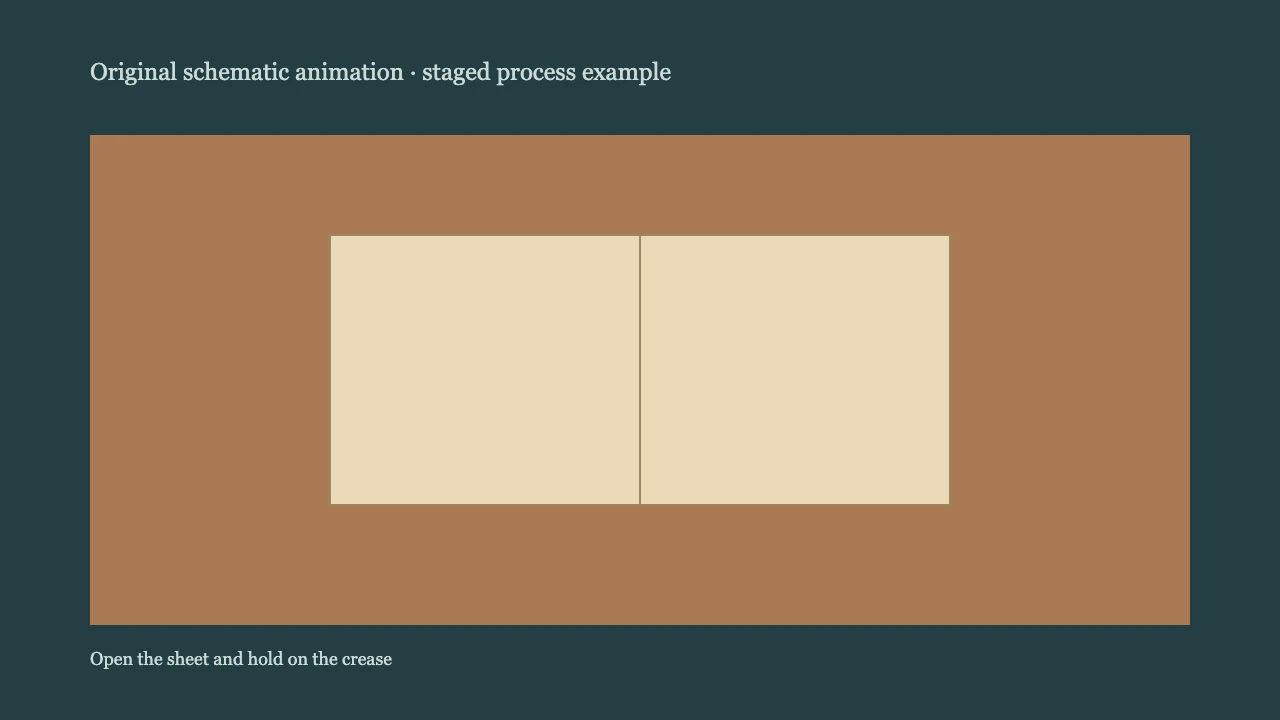
The initial view establishes the rectangular sheet, the middle view brings the two short edges together, and the last view reopens the sheet and holds on the center crease. Compare each transition with the spoken sentence. If the picture moves ahead of the explanation, change the edit or shorten the line before increasing the speaking speed.
The final silent hold is intentional. Browser playback and file checks can confirm that the export runs and contains sound; a person must still judge whether the voice and picture communicate naturally.
Select a voice after the scene has a purpose
Voice selection should follow the editorial decision about style and pace. A voice that sounds appealing in isolation may be too energetic for restrained footage or too soft for a scene that needs clear explanation.
When reviewing narrator voices, test a short section that includes the actual challenges of your script: a proper name, a date, a transition, and a sentence with an intended pause. Do not make a decision from a single promotional line.
Listen for:
- Whether the voice is intelligible over planned music and ambience
- Whether emphasis falls naturally on the key words
- Whether the tone matches the subject without becoming theatrical
- Whether pauses support the image rhythm
- Whether the delivery remains consistent across several paragraphs
If a line needs repeated punctuation tricks to sound right, revise the sentence before assuming the voice is the problem. Clear writing usually produces clearer delivery.
For a broader introduction to creating voiceovers from written scripts, see text-to-speech online.
A practical review pass before export
Before finalizing a documentary narration track, review the edit in four passes.
1. Watch without narration
Confirm that the sequence has visual logic. Note where the viewer may need orientation and where the picture already communicates enough.
2. Listen without picture
Check for unclear references, overloaded sentences, abrupt changes in tone, and phrases that sound written rather than spoken.
3. Watch the full edit at normal volume
Look for lines that arrive too early, continue too long, or compete with music and natural sound. Mark the exact frame where the problem begins instead of making a general note such as “pace feels off.”
4. Revise the script and timing together
Do not treat script edits and picture edits as separate tasks. Cutting five words may create room for a longer shot. Extending a pause may make a transition feel intentional. Small changes in either track can improve the entire sequence.
Make the narration serve the scene
Export one complete scene before recording the full script. Check its facts, watch the intended pictures, and revise any line that obscures an important visual beat. Keep the approved script, audio and timing notes together.