




Learning how to translate a video from Spanish to English involves more than replacing one set of words with another. A useful English version needs to preserve the original meaning, fit the video’s timing, sound natural for its intended audience, and make sense in the visual context. Whether you are creating subtitles, an English voiceover, or both, a structured video translation workflow can help you avoid costly revisions later.
Spanish video translation is especially important when your audience includes English speakers who may not understand the original dialogue, on-screen text, or cultural references. The process starts with clear source material and ends with a thorough review of the translated version in the actual video—not just in a document.
Choose the right English-language format
Before translating the script, decide how viewers will experience the English version. Your format affects the translation style, production timeline, and review process.
Subtitles or captions
English subtitles display translated dialogue as timed text on screen. They are often a practical choice when you want to retain the original Spanish audio and preserve the speaker’s performance.
Subtitles work well when:
- The original speaker’s voice is important to the video.
- Your viewers may watch with sound off.
- You need an accessible text option alongside the video.
- You want a relatively lightweight way to localize content.
Captions may also include non-speech information, such as music cues or relevant sound effects. If accessibility is a priority, plan for those details during transcription and editing.
English dubbing or voiceover
Dubbing replaces or layers over the Spanish audio with English speech. This can make a video easier to follow for viewers who prefer listening rather than reading subtitles.
An English dub requires additional preparation because translated speech must fit the visual pacing. A direct translation can be too long, too short, or difficult to say naturally within the available time.
Voiceover may be a better fit when exact lip synchronization is not necessary. For example, explainers, tutorials, presentations, and some social videos can use a voiceover style that prioritizes clarity and pacing over matching every mouth movement.
A combined approach
Some videos benefit from both dubbed audio and subtitles. This gives viewers options and can support comprehension in different viewing situations. If you create both, review each asset independently. The subtitle wording does not always need to match the spoken English word for word, particularly when subtitle length must be limited for readability.
For a broader overview of multilingual voice production and planning, see the AI Dubbing Guide.
Step 1: Prepare the Spanish source video
Translation quality depends on the quality of the source materials. Start by collecting the most complete version of the Spanish video and any supporting materials available.
Useful materials include:
- The final video file
- The original Spanish script or shooting script
- A transcript, if one exists
- On-screen text, slides, lower thirds, and graphics
- Brand terminology and product names
- Notes about the intended English-speaking audience
- A pronunciation guide for names, places, and specialized terms
If the video includes multiple speakers, identify each speaker in the transcript. Speaker labels help translators and reviewers understand who is talking, what their role is, and whether the English delivery should sound formal, conversational, instructional, or promotional.
Also note sections with poor audio, overlapping speech, jokes, regional expressions, or references that rely on visual context. These are common places where an automatic transcript or a literal translation may need extra attention.
Step 2: Create and verify a Spanish transcript

A clean source transcript is the foundation of a reliable translation. Even if you begin with automated transcription, review it against the video before moving forward.
Check for:
- Misspelled names and locations
- Missing words or interrupted phrases
- Incorrect punctuation that changes the meaning
- Speaker changes
- Acronyms and numbers
- Background speech that should or should not be included
- Terms that may have more than one meaning
Spanish varies across countries and regions. A phrase used in Mexico may carry a different tone or meaning in Spain, Argentina, Colombia, or another Spanish-speaking market. Identify the variety of Spanish used in the video when possible, especially for colloquial language.
Accurate transcription matters because translation cannot reliably correct a misunderstood source phrase. If a sentence is unclear in the transcript, return to the audio, consult the original creator when possible, and document the decision before producing the English version.
Step 3: Define the English audience and localization goals
Translation answers the question, “What does this say?” Localization also asks, “How should this be presented for this audience?”
Define who the English version is for before the translation is finalized. For example, the target could be a general US audience, existing customers, learners, business decision-makers, or social media viewers. Each group may expect a different level of formality, vocabulary, and explanation.
Create a short localization brief that covers:
- Target market and audience
- Desired English variant, such as US English
- Brand voice and preferred terminology
- Words that should remain in Spanish
- Product names that should not be translated
- Units, dates, currency, and measurement conventions
- Sensitive cultural references or claims that need review
- The desired call to action
A localization brief helps keep decisions consistent when several people contribute to the project. It also gives reviewers a clear standard for evaluating whether the English version feels appropriate rather than merely understandable.
Step 4: Translate for meaning, tone, and timing

Translate the Spanish script into natural English first. Avoid trying to force a word-for-word result. Spanish and English have different sentence structures, rhythms, and levels of directness, so an exact literal translation can sound awkward or exceed the available speaking time.
A strong translation should preserve:
- The core meaning
- The speaker’s intent
- The appropriate tone
- Essential brand and technical terminology
- Clear instructions, names, and calls to action
At the same time, it may need to adapt idioms, humor, greetings, or culturally specific references. For example, a phrase that makes sense to a Spanish-speaking audience may need a short explanation, a comparable English expression, or a different phrasing entirely.
For spoken English, read each translated line aloud. If it is difficult to say smoothly, it will probably be difficult for viewers to follow. This simple test can reveal overly formal phrasing, long clauses, and unnatural word choices.
Account for expansion and compression
The English script may not match the Spanish script’s exact duration. A translated sentence can become longer or shorter even when the meaning remains intact.
For a dubbed video, compare the translated lines with the original timing. Where the English is too long, simplify the wording without removing key information. Where it is too short, do not add filler automatically; a shorter, clear line may be preferable if the video pacing allows it.
For subtitles, prioritize readable phrasing over mirroring every spoken word. Break lines at natural points in the sentence and avoid separating closely connected words or names.
Step 5: Adapt on-screen text and visual elements
Dialogue is only one part of video translation. Review every visual element that carries meaning for the viewer.
This can include:
- Titles and chapter cards
- Lower-thirds and name labels
- Charts and diagrams
- Slide text
- End screens
- Calls to action
- Social media graphics
- Embedded screenshots or interface labels
Translate on-screen text according to the same terminology decisions used in the script. If a graphic has limited space, rewrite the English for clarity instead of shrinking text until it becomes hard to read.
Review dates, currencies, measurement units, phone numbers, website paths, and legal language carefully. These elements may need localization rather than direct translation. If the video includes compliance, medical, financial, legal, or safety-related content, route the localized version through the appropriate review process for your organization.
Step 6: Produce the English audio, subtitles, or both
Once the English script is approved, produce the viewer-facing assets. The right approach depends on your chosen format, production resources, and quality requirements.
For English dubbing or voiceover, make choices about voice, pace, pronunciation, and delivery before generating or recording the final audio. The selected voice should fit the video’s purpose and audience. A product tutorial may need calm, precise delivery, while an entertainment clip may call for more energy.
If you use text-to-speech as part of the production process, listen closely for pronunciation of names, acronyms, borrowed Spanish terms, numbers, and product terminology. Adjust the script or pronunciation guidance as needed, then review the result in context with the video rather than judging audio in isolation.
Using Typecast for the English voiceover
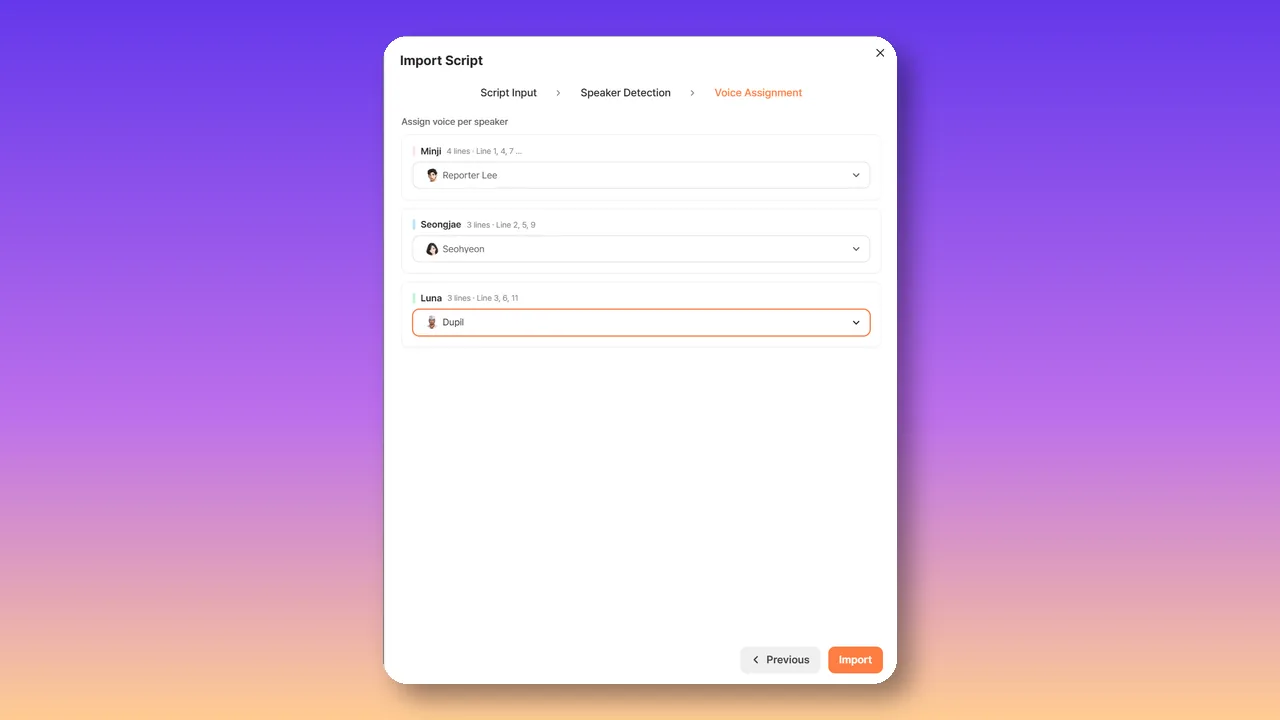
After the translation is approved, open Typecast’s AI Voice Editor and start an English project. Paste the translated English script directly, or choose Import Script for a multi-speaker script. Use the Speaker: dialogue format so Typecast can detect speaker turns.
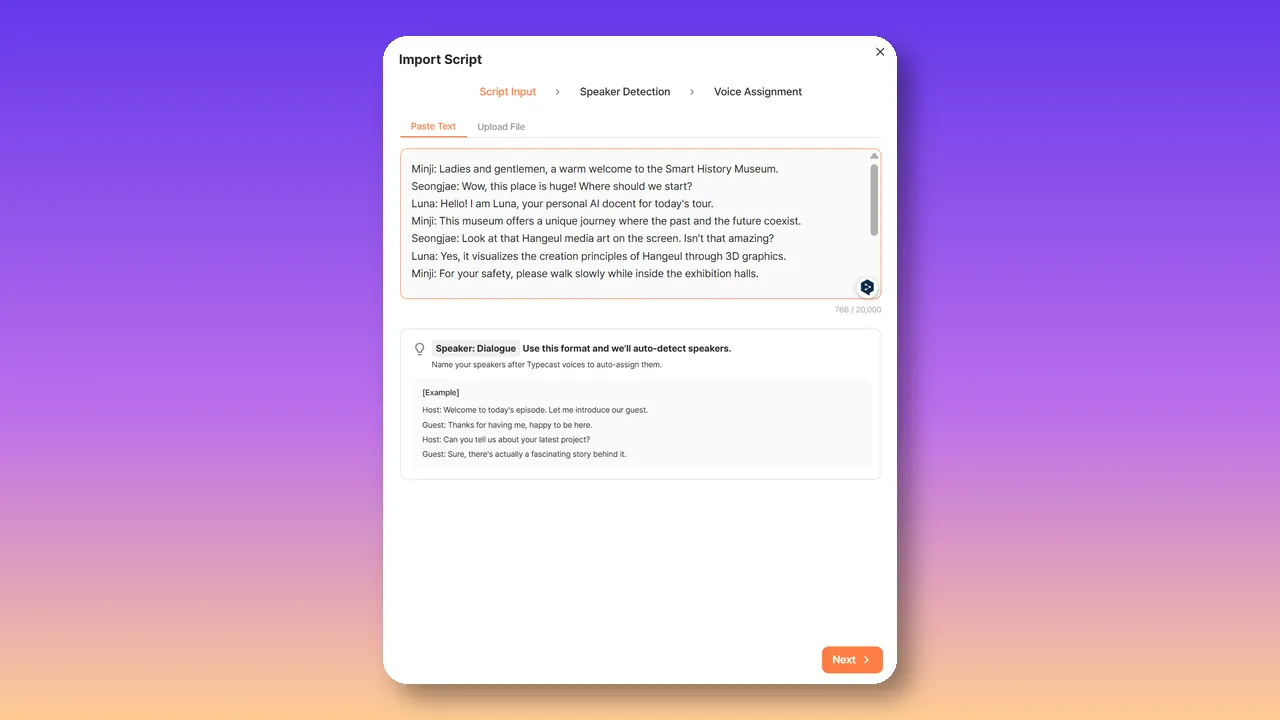
Review the detected speakers, then assign an English voice to each one. Listen to a sample and adjust emotion, speed, dynamics, and pronunciation before regenerating the final lines.
For short-form social content, the visual pace is often faster and captions can carry much of the message. A workflow such as Typecast’s AI TikTok video creator can be relevant when planning video assets for a vertical, mobile-first format. Regardless of the toolset, make sure the English wording remains readable at the speed viewers will encounter it.
Step 7: Time subtitles and align English audio
Timing is where a translation becomes a usable video experience. Place subtitles so they appear when the corresponding idea is spoken, and leave enough time for viewers to read them comfortably.
For dubbing, align the English delivery with visible actions, scene changes, and speaker turns. Exact lip synchronization may not be necessary for every video, but obvious mismatches can distract viewers. Pay special attention to close-up shots, interviews, and scenes where the speaker’s mouth is clearly visible.
Watch for these timing issues:
- A subtitle disappears before it can be read.
- A subtitle covers important on-screen information.
- English speech starts before the relevant action appears.
- A voice continues after the original speaker has clearly finished.
- A scene change interrupts a thought.
- A long translated phrase is rushed to fit the original clip.
When timing is tight, revise the English line before increasing the speaking speed too aggressively. Clear, natural delivery is usually more valuable than preserving every word from the source.
Step 8: Review the completed English video
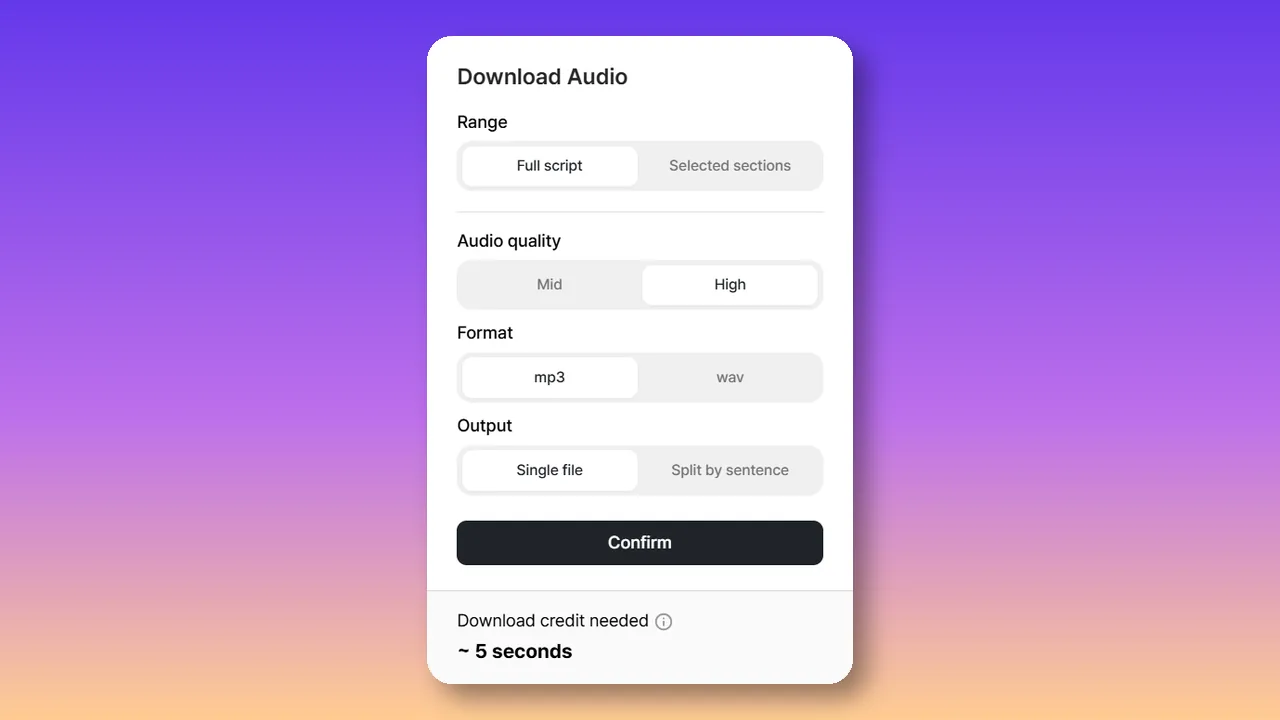
A final review should include more than a spelling check. Watch the translated video from beginning to end as a viewer would, with the intended audio and subtitle settings. In Typecast, preview the full English voiceover before choosing Download. Then select the range, audio quality, file format, and whether to export one file or split the output by sentence.
Use a review checklist that covers four areas.
Language accuracy
- Does the English preserve the intended Spanish meaning?
- Are names, numbers, and terminology correct?
- Are idioms and references understandable for the target audience?
- Is the grammar and punctuation appropriate for US English?
Audio and delivery
- Is the English easy to understand?
- Are pronunciations correct?
- Does the delivery fit the intended tone?
- Does the pacing sound natural?
Visual and timing quality
- Are subtitles synchronized and readable?
- Is on-screen text translated correctly?
- Does the audio fit the scene timing?
- Are important visuals unobstructed?
Audience and brand fit
- Does the wording match the intended audience?
- Is the call to action clear and locally relevant?
- Does the version maintain the brand’s preferred voice?
- Are there cultural references that need revision?
When possible, have a reviewer who was not involved in the original translation watch the final video. A fresh viewer is more likely to notice confusing phrasing, fast subtitles, inconsistent terminology, or missing visual text.
Common mistakes to avoid
The fastest way to translate video to English is not always the most effective way. Avoid these common issues:
- Translating without a verified transcript. Errors in the Spanish source can become harder to detect after translation.
- Using literal wording for every line. Natural English often requires restructuring.
- Ignoring visual context. A spoken line may refer to something shown on screen rather than named aloud.
- Forgetting on-screen text. Viewers may miss critical information if graphics remain only in Spanish.
- Rushing the English audio. Fast delivery can reduce comprehension and weaken the intended tone.
- Reviewing only the script. The final video can reveal timing and layout problems that are invisible in a document.
- Skipping audience localization. A grammatically correct translation may still feel unfamiliar or unclear to US viewers.
Build a repeatable Spanish video translation workflow
For recurring content, create a repeatable process rather than treating every video as a one-off task. Maintain a terminology list, a translation brief template, subtitle style guidance, and a final review checklist. Save approved translations for recurring product names, taglines, feature descriptions, and calls to action.
A consistent workflow makes it easier to move from Spanish source material to an English version that viewers can understand and trust. Start with an accurate transcript, translate for meaning and audience fit, adapt the visual elements, produce well-timed audio or subtitles, and review the complete video before publishing. That approach helps ensure your English-language video feels like it was made for its new audience—not simply converted from another language.