





When planning a narration, words per minute voice over is a useful starting point for estimating how long a script may run. It is not a fixed rule, though. A 900-word explainer can take very different amounts of time depending on the speaker, audience, subject matter, pauses, pronunciation, and performance direction.
The most reliable workflow is simple: use a preliminary words-per-minute estimate to scope the script, create a draft read, then time the actual audio. This approach helps you set realistic expectations without forcing every voiceover into one pace.
The basic voiceover timing formula
Use this formula to estimate a script’s running time:
Estimated duration in minutes = total script words ÷ words per minute
For example, a 750-word script read at 150 words per minute (WPM) would have an estimated duration of five minutes:
750 words ÷ 150 WPM = 5 minutes
To estimate in seconds instead, multiply the minutes by 60:
Estimated duration in seconds = (total script words ÷ WPM) × 60
This arithmetic is useful for rough planning, such as deciding whether a script fits a 30-second ad slot, a two-minute product video, or a longer training module. It should not replace a timed read when the runtime matters.
Script-length table: word count by pacing scenario

The table below shows transparent timing scenarios, not universal voiceover standards. It assumes continuous spoken words and does not automatically account for long pauses, music breaks, demonstrations, or retakes.
| Script word count | 100 WPM | 125 WPM | 150 WPM | 175 WPM |
|---|---|---|---|---|
| 100 words | 1:00 | 0:48 | 0:40 | 0:34 |
| 250 words | 2:30 | 2:00 | 1:40 | 1:26 |
| 500 words | 5:00 | 4:00 | 3:20 | 2:51 |
| 750 words | 7:30 | 6:00 | 5:00 | 4:17 |
| 1,000 words | 10:00 | 8:00 | 6:40 | 5:43 |
| 1,500 words | 15:00 | 12:00 | 10:00 | 8:34 |
For a quick estimate, divide your word count by a few plausible pacing scenarios instead of choosing one number too early. That gives you a practical duration range to discuss with stakeholders.
For instance, a 600-word script may be approximately:
- Six minutes at 100 WPM
- Four minutes and 48 seconds at 125 WPM
- Four minutes at 150 WPM
- About three minutes and 26 seconds at 175 WPM
The right scenario depends on what listeners need from the recording, not simply on how quickly words can be spoken.
Why one WPM number is not enough
A voiceover’s pace affects clarity, tone, and comprehension. A rapid read may suit a short, energetic announcement, while an instructional narration may need room for listeners to absorb steps and terminology. Presentation guidance also distinguishes a speaker’s rate from the overall pace of ideas, including emphasis and transitions. Stanford’s delivery guidance explains why pacing is more than the speed of individual words.
Pauses matter as well. They can help an audience process an idea, and trying to squeeze too much information into a short time can make a presentation harder to follow. The University of Minnesota’s presentation guidance recommends using pauses for understanding rather than rushing through excess information.
That means a word-count estimate is only the first layer of planning. A finished runtime can change because of:
- Natural pauses after key ideas or before a CTA
- Pronunciation of names, product terms, URLs, and acronyms
- Numbers, dates, currencies, and technical language
- Dialogue between multiple voices
- On-screen actions that need silence or slower narration
- Emotional delivery, emphasis, and deliberate phrasing
- Intro music, transitions, legal copy, or end cards
Choose a pacing scenario for the job

Rather than asking, “What is the standard WPM for voiceover?” ask what the audience needs to do while listening.
Short promotional videos
Short promotional scripts often have tight runtimes and concise messaging. You may test a somewhat faster scenario, but leave enough time for the brand name, benefit statement, and CTA to land clearly. If the copy only works at an uncomfortable speed, the script likely needs editing.
Explainers and product demos
Explainers need space for concepts, visual changes, and product terminology. Build in time for viewers to connect the narration to what appears on screen. A script that looks brief on the page can feel rushed when it includes UI labels, feature names, or step-by-step instructions.
Training and educational content
Instructional content usually benefits from deliberate pacing and purposeful pauses. Learners may be following a process, reading a slide, or using software at the same time. Plan for comprehension, not just delivery speed.
Compliance, legal, and technical scripts
These scripts may contain exact terminology, disclosures, model numbers, or specialized words that take longer to say and understand. Count the words, but also flag passages that require careful articulation. A single dense sentence can affect the timing more than its word count suggests.
Social and vertical video
A short social video may need a brisk opening, but clarity still matters. Time the hook, the main point, and the ending separately. This makes it easier to identify where to trim language instead of accelerating the entire read.
How to estimate voiceover length before recording
Use this five-step process when you are still drafting.
1. Count spoken words only
Start with words the audience will hear. Exclude scene directions, camera notes, production comments, and on-screen text that is not narrated.
Be careful with items that may look short but take time to speak, including abbreviations, web addresses, dates, formulas, and lists. Read these aloud once before relying on an automated word count.
2. Select a timing range
Use two or three WPM scenarios that fit the content. For example, a training script might be planned against a slower, middle, and faster draft range rather than one assumed rate.
A range gives editors a better planning tool than a single exact number. It also makes room for a performance that sounds natural.
3. Add non-speech time separately
Do not hide long pauses inside an arbitrary WPM value. List them separately when they are intentional.
For example, a 400-word narration may estimate to about three minutes at a selected pace, then gain another 15 seconds for an opening pause, a product demonstration beat, and an end card. This makes the timing logic easier for reviewers to check.
4. Read the script aloud
A human read quickly reveals awkward phrasing, overloaded sentences, and words that take longer than expected. Mark points where a listener needs a beat to absorb an idea.
If you need to speed up significantly to meet the intended runtime, edit the copy first. Removing repetition or simplifying a sentence is usually better than sacrificing intelligibility.
5. Time a draft audio reading

Once the script is close, replace the estimate with a measured result. If you use Typecast, listen to a draft reading with a stopwatch and measure from the first spoken word to the last. Keep notes on the voice, delivery direction, and script version so later comparisons are meaningful.
You can then revise the script, retime it, and make decisions based on the actual draft rather than a theoretical pace. To begin the workflow, create a text-to-speech voiceover.
Measured example: one script, two Typecast settings
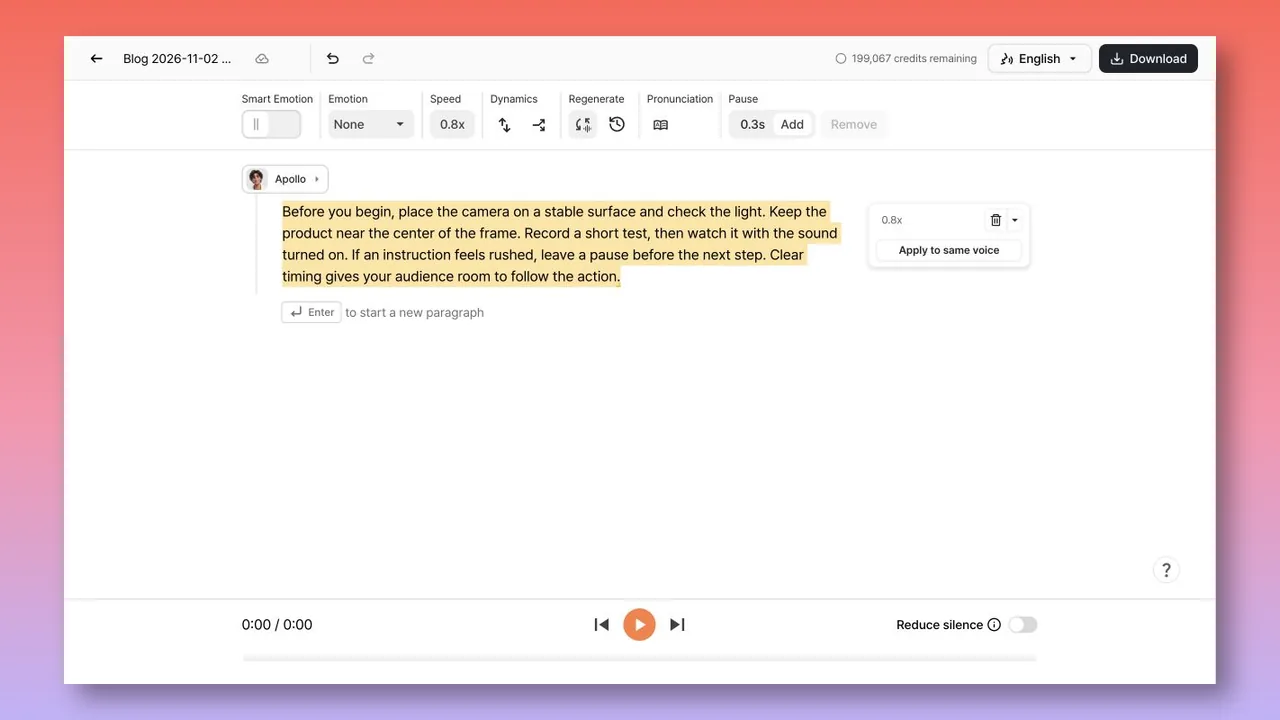
We exported the same 57-word English script with Apollo in Typecast Studio at 1.0× and 0.8×, with Reduce silence off. Both files are mono, 44.1 kHz, 16-bit PCM WAV. These are two individual generations, not a controlled benchmark of every voice or script.
Sample A — Apollo, 1.0×, 21.20 seconds
Sample B — Apollo, 0.8×, 31.50 seconds
Transcript for both: Before you begin, place the camera on a stable surface and check the light. Keep the product near the center of the frame. Record a short test, then watch it with the sound turned on. If an instruction feels rushed, leave a pause before the next step. Clear timing gives your audience room to follow the action.
Dividing 57 words by each complete file duration gives approximately 161 and 109 words per minute. These measurements include all file silence; they are not first-word-to-last-word speaking rates. The speed setting did not translate into an exact inverse duration ratio in these two outputs, so measure the exported file instead of predicting its duration from the slider alone.
Listen for whether instructions have enough space to follow, whether pauses fall naturally, and whether any word is clipped or mispronounced. A longer file is not automatically clearer.
How to shorten a script without making it sound rushed
When a voiceover runs long, increasing the pace is not the only option. Look for edits that preserve the message while reducing spoken load.
Try these techniques:
- Replace repeated benefits with one specific statement.
- Turn long setup sentences into direct language.
- Remove details already clear from the visuals.
- Combine similar list items.
- Move nonessential context to supporting on-screen text.
- Use shorter transitions between sections.
- Review whether every adjective, qualifier, and recap supports the goal.
For example, “Our innovative and easy-to-use platform helps teams quickly and efficiently complete their daily work” can often become “Our platform helps teams complete daily work faster.” The exact edit depends on the brand voice, but concise language typically creates more timing flexibility than a faster read.
A practical final-check checklist
Before approving a voiceover script, confirm the following:
- The word count includes only spoken copy.
- The estimated WPM is a planning scenario, not an assumed universal norm.
- Intentional silence, visual beats, and music are timed separately.
- Names, numbers, acronyms, and URLs have been read aloud.
- The draft has been timed with the intended voice and delivery style.
- The final runtime meets the placement or platform requirement.
- Any last-minute copy edit is retimed before production approval.
Estimate first, then measure
Words per minute is a valuable script-planning metric because it turns word count into a workable duration range. But voiceover timing is ultimately a listening task. The same script can change length when its voice, pauses, emphasis, and audience needs change.
Use the table and formula to scope your draft, then time a real reading before you lock the script. For more guidance on building spoken-audio workflows, explore text-to-speech online.